Wednesday, 29 July 2015

Google Testing Ads on Knowledge Graph

type='html'>
Google adds yet another ad revenue generating idea by testing ads on its recent Knowledge Graph extension. The Knowledge Graph is the brain of Google which lets Google discover relationships between identities and helps to solve the semantic relationship between queries. It's set to revolutionize the search experience for Google. Such a useful and important platform for users cannot go without ads. So, Google soon decided to monetize Knowledge Graph extension by adding ads on them.

This news was published recently at seroundtable and it was originally shared by gfiorelli1 on Twitter.


Google had recently added automobile related information on its Knowledge Graph and has soon started to test ads displaying nearby dealers when someone is searching for specific car related information.See an example of Knowledge Graph getting displayed when someone is searching for 2014 Honda Accord. (Since Google is still testing the ads so you won't be able to see the ads right now.) Soon knowledge graph would be having ads.

Also See:

Google Introduces the Knowledge Graph
How Does Google Applies Semantic Search?
Latent Semantic Indexing
Facebook Graph Search Optimization
Getting Listed on Search Engines
Google Query Processing by Identifying Entities
Fixing Disapproved Ads
Taxonomic Classification While Finding Context of Search Query
Google Granted Patent for Detecting Hidden Texts and Hidden Links
Rich Snippets in Google
How to Add Ratings and Review Stars on Google Search Results
Query Highlighting on Google Search Results
List of Google Search Operators
Universal Analytics

5 Ways To Boost SEO by Leveraging Google Brandvantage

type='html'>
Are you worrying the next Panda or Penguin update? Is the fear of losing traffic and revenue from your website not letting you sleep? Here are top 5 ways that will force Google to take your Website seriously.

1- Forget "Website" and Think of "Brand"

I have been saying this too often and now the time is ripe enough to start taking your website as a brand. The product or service you sell should not be anonymous (lesser known brands are same as anonymous because nobody has ever heard about them), instead it must be related to a well known brand. If you are able to do this then Google will start taking your website seriously. I know this is not easy but ultimately you will have to adopt to this strategy. 

Image Credit: Audiencebloom.com


Read the posts given below to learn how to start taking advantage of Google's brandvantage:


2- Invest in Earning Trusted Seed Links - Yes, Investment Would be High

Yes, I wrote that in the title itself that investment would be high but hold on that investment is not for buying links but instead spending in offline promotion to earn trusted seed links. Ever thought of providing a crispy story to trusted and authority sites, think of what your brand can do, enable your mind to deep dive in order to fetch ideas for publicizing your brand and you will hit the jackpot! Trusted seed links = Google love! (as of now)


Have a read at the below posts to learn more as to how you can earn high trusted links:


3- Grab User Attention- Serve Them and Not Google

At the end of the day, who are you waiting for in order to get a successful conversion? Google or the user? You got that correct! Serve the users and get conversions. Designing a site primarily for the search engines will not help in conversions. Every decision whether designing a website or adding content should be focussed towards the user and not the search engine. Think for the humans and Google will reward you.

Image Credit: Tryerr.com

Some brain feeders:


4- Remain in NEWS, Be Social

What does a child does in order to grab the attention of parents?? Hmm...he cries!! If an infant understands what is the right strategy to get user attention then why can't you? Always try to remain in the NEWS, let people recognize your brand instantly and gather as much social love as you can.

Image Credit: Q4websystems.com


The below tutorials will help you to learn more:


5- LOVE the User- Yes, Do Everything to Impress Them

Grab the attention of the user and solidify the belief that your brand is authentic and genuine. Focus your marketing efforts in a manner that it makes the user return to you again and again. Respect and love the user so that your brand benefits from "word of mouth". 

These are some ways (I know they don't talk about SEO but rather marketing) to fuel your conversions and let Google to take your website (BRAND) seriously.

Also See:


How to Fix a Disapproved Ad in Adwords?

type='html'>
It can be extremely frustrating for a business generating revenue from Adwords to see their ads getting disapproved. Being the best PPC network in the US, as quoted by PPC Management Company, Webrageous, businesses find it extremely necessary to get that ads running on Adwords. There are several reasons for a disapproved ad. This post will shed some light on how to fix the disapproved ads in PPC?

disapproved

Monitor Your Adwords Account


It is important to constantly monitor the Adwords account in order to find out which ads are disapproved. You may find the disapproved ads under the status column located under the ads tab of your campaign page. Check out the reason for disapproval and fix it as per the directions.

Reasons for Disapproval


Violation of Google’s ad policies is the only reason for disapproval. Google divides 7 important policy types regarding the successful running of the ad. These are:-

User Experience – The ads should serve the users well. Variables like accurate phone numbers, ads character limit (25 characters for headline and 70 characters for description), image and video file limitations, accurate company details, excessive capitalization, no instant download links etc. are all important.

Safety and Security – Google follows the policy that users should experience a safe and secure advertising. Sites should keep themselves safe from all forms of viruses, phishing, Trojans, scams, cloaking etc. It must be the responsibility of the webmasters to ensure that their sites provide a safe browsing experience.

Accuracy - Claims made by an advertiser should be accurate. All the offers and discount including the pricing information should be up to date.

Violation of User’s Privacy or Trust – Ads should not violate the user’s trust or privacy. Google does not allow running of ads whose primary motive is to collect personal information. Also, sites should be SSL secured if they are dealing with personal credit card information of their customers.

Legal and Safe Products or Services - Google does not allows ads related to abortion, sexual services, illegal drugs, illegal hacking, promotion of tobacco products etc. It allows restricted promotion of gambling and casino related services.

Copyright Laws – All the ads should be legal for every respective country. Any ad violating laws country laws, state laws, business industry laws etc are disapproved. Copyrighted materials are not allowed for promotion unless being approved.

Compatibility with Google’s Brand Decisions


Ads must be compatible with Google’s own brand decisions like any ad which are violent and are against a particular group of people or organization. Ads which use inappropriate languages like using the word “click” as a call to action phrase are eligible for disapproval by Google.

Some Tips


Always enable the “policy details” column while running your ads as this will enable you to see the approval status of your ads. You can enable policy details by going to the ads tab, clicking columns, then clicking customize columns and then clicking on add next to policy columns.

You may also apply filters to find out all the disapproved ads at once.

To apply filters follow the below steps:-

1-      Go to campaigns tab.
2-      Click on the ads tab, then click filter.
3-      Select “Create Filter” and choose “Approval Status” from the drop down menu.
4-      Remove the check boxes except “Disapproved”.
5-      Click apply and you are done.

Editing the Old Ad and Creating a New One


Before editing the old ad, find out the reason for its disapproval by using the above methods. Then, go ahead and create a new ad which complies with the Google guidelines. In most of the cases, changes in ad text solve the problem else you also need to make changes in the URL to get your ad approved.

Google’s advertising Policies

To view, Google’s full advertising policies that affects the approval of an ad to be displayed in search results, please visit:- https://support.google.com/adwordspolicy/topic/1626336?hl=en&ref_topic=2996750

Avoiding Ad Disapprovals

Here is a video sharing awesome tips on how to avoid ad disapprovals on adwords:-


Also See:- 

Adwords Quality Score
Basics of Google Adwords
Seo Vs PPC Comparison
Determine a Keywords Overall Worth
How to Calculate CTR

How to Track Facebook Likes in Google Analytics

type='html'>
Most of the websites nowadays have the Facebook like button installed on them. But, a few of the webmasters know how to capitalize the worth of the like button by carefully tracking which pages of your website are the most popular and generates the maximum of likes. In layman terms, you can track the number of Facebook likes from each of your individual pages in order to find out which pages on your site are the most popular and receives the maximum Facebook shares. This is referred as "Social Interaction Web Tracking".

Facebook Like Button Tracking


You will need to utilize the Facebook's edge.create button and create a call back function.

Here is the code to do so:-

SYNTAX

FB.Event.subscribe('edge.create', function(targetUrl) {
  _gaq
.push(['_trackSocial', 'facebook', 'like', targetUrl]);
});

Required Script

You need to add the script given below just after the Facebook insights script:- 

<script>
  window.fbAsyncInit = function() {
    FB.Event.subscribe('edge.create', function(targetUrl) {
      _gaq.push(['_trackSocial', 'facebook', 'like', targetUrl]);
    });
</script>

The above script will start tracking the number of likes that people make while sharing your site's content on Facebook.

Also See:- 

Facebook Graph Search
Facebook Voice Messages


Pinterest Promoted Pins - Get Ready for Advertising on Pinterest

type='html'>
Joanne Bradford, Head of Partnerships, Pinterest, recently wrote in a blog post that the next phase of advertising on Pinterest via promoted pins are coming soon. Pinterest currently has tens of millions of people in its platform who have shared around 30 billion pins on the site. The numbers are huge so is the scope of advertisement. Big brands are signing up for promoted pins as its still in the beta stage. The first paid test of this new mode of advertising on Pinterest is carried out with a small group of brands like Expedia, Target, Gap, Walt Disney parks and resorts, Nestle, Old Navy, Kraft etc. 


It is expected that Pinterest will launch its new product soon after it gathers the required feedback and data from the conducted test. 

Currently this test is conducted in US only. 

If you are interested in learning more about promoted pins then fill out the form below:


Also See:


Tuesday, 28 July 2015

How to Write a Google Reconsideration Request?

type='html'>
Webmasters may feel the need to submit a site reconsideration request to Google if they have violated the Google Webmaster Guidelines in some way or the other.

Writing a Google Reconsideration Request (Image credit:- itechdestiny)

What is a Reconsideration Request?


Reconsideration request is an email that is sent to Google via Google Webmaster Tools explaining about the faulty techniques used by the webmaster to increase the search engine rankings of their website and a promise that it won't happen in future.

When Should We Send a Reconsideration Request?


Whenever the site loses its presence on Google then it becomes necessary for the webmaster to send a reconsideration request to Google in order to get the site back.

What Should be Included in a Reconsideration Request?


You must include all the details of the spammy tactics that you have used in order to influence the search engine rankings. You must tell how these tactics violated the Google guidelines? specifying the sources included in your spammy work. Some of the example are cloaking, paid links, bad neighbourhood, malware etc. You must convince Google that you have corrected the issues that caused the penalty and it won't happen in future.

Have a look at this video from Matt Cutts in order to have a better explanation of the things to include in a reconsideration request.


Also See:-

Bing Webmaster Guidelines
Why Paid Links Are a Violation of Webmaster Guidelines
3 Seo Fundamentals Every Webmaster Should Follow
Crawl Error Alert Feature in Webmasters
Google Disavow Links Tool
Google Unable to Crawl Robots.txt

Google Updates Analytics- Replaces Visits with Sessions and Adds Graphs

type='html'>
Google Analytics has updated for the better and today I noticed a few changes being made on the analytics interface. Visits have been replaced by sessions (which technically means the same thing) and unique visitor metric has been replaced with users (which also means the same). Here is a screenshot that displays the new metrics namely sessions and users.

What are Sessions and Visits?

Sessions and visits are synonymous. When any visitor visits the site, a session gets created and this session remains active for 30 minutes or less if the site is closed by the visitor. Hence, visitors create sessions and 1 visit is equal to 1 session minimum.

What are Unique Visitors and Users?

It may happen that a single user can create multiple sessions over a period of time like for the past 30 months. In that case, the user metric displays the number of unique visitors who have created unique sessions.

Hence, I hope the confusion is clear. Google has gone a little technical from being layman.


Graphs Under the Acquisition Overview

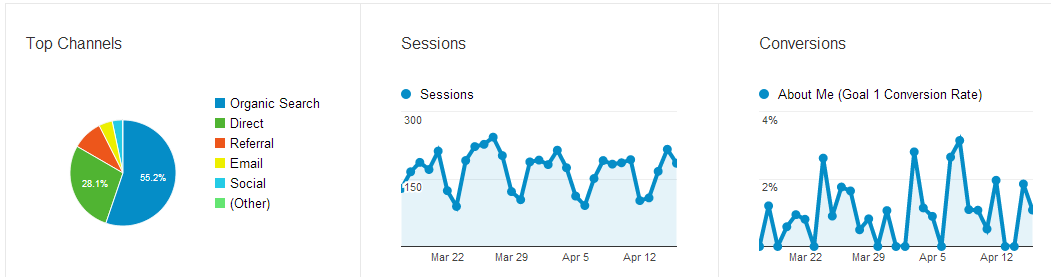
Google has also added some useful graphs under the Acquisition overview. These are Top Channels, Sessions and Conversions. 


Also See:

How Does Google Calculates Bounce Rate and Exit Rate
How to Create Goals in GA?
Google Analytics Interview Questions and Answers
Regular Expressions on Google Analytics
List of Google Search Operators
Multi Channel Funnels in GA
100 FREE Tutorials for Learning Analytics